“The container is up” only says a process started. It does not say the service answers, that its database is initialized, or that a user can reach it through the proxy. This post deploys Uptime Kuma on MariaDB with healthchecks on both containers, puts it behind SSO, and creates monitors from an idempotent Python script, because Uptime Kuma has no REST API for that. The script and the failure cases below were tested on a throwaway demo stack with a stub identity provider, using the image versions pinned here.
Step 1: See what you are building#
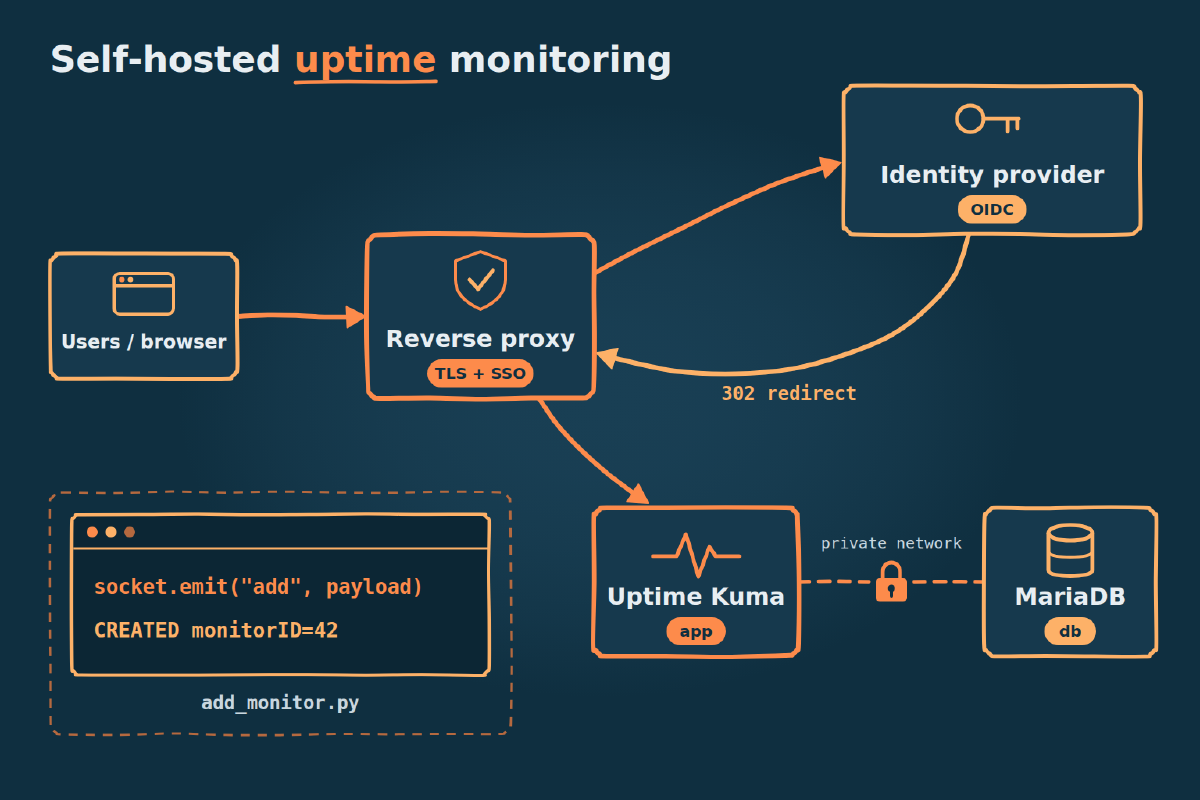
Two containers, two networks, and one way in.
browser --HTTPS--> reverse proxy --forward-auth--> identity provider
                        |
                        | proxy network (external)
                        v
                   uptime-kuma :3001          app container
                        |
                        | uptime-kuma-internal (internal: true)
                        v
                   uptime-kuma-db :3306       database container, no published port
You need a monitoring host running Docker, plus a reverse proxy on a shared Docker network. This post assumes Traefik and an OIDC identity provider, which the SSO post in the security series covers. Confirm the network exists:
docker network inspect proxy --format '{{.Name}}'
# proxy
Step 2: Write the compose file#
The app must not start until the database is genuinely ready. This is a sanitized version of a deployment I run. Adjust the names to your setup.
# compose.yml: contains no secrets, safe to commit
services:
  uptime-kuma:
    image: louislam/uptime-kuma:2.5.9
    restart: unless-stopped
    depends_on:
      uptime-kuma-db:
        condition: service_healthy
    environment:
      - UPTIME_KUMA_DB_TYPE=mariadb
      - UPTIME_KUMA_DB_HOSTNAME=uptime-kuma-db
      - UPTIME_KUMA_DB_PORT=3306
      - UPTIME_KUMA_DB_NAME=${MYSQL_DATABASE}
      - UPTIME_KUMA_DB_USERNAME=${MYSQL_USER}
      - UPTIME_KUMA_DB_PASSWORD=${MYSQL_PASSWORD}
    volumes:
      - uptime-kuma-data:/app/data
    healthcheck:
      test: ["CMD", "extra/healthcheck"]
      interval: 30s
      timeout: 5s
      retries: 5
      start_period: 180s
    networks:
      - uptime-kuma-internal
      - proxy
    labels:
      - traefik.enable=true
      - traefik.docker.network=proxy
      - traefik.http.routers.uptime-kuma.rule=Host(`domain1.example.com`)
      - traefik.http.routers.uptime-kuma.entrypoints=websecure
      - traefik.http.routers.uptime-kuma.tls.certresolver=cloudflare
      - traefik.http.routers.uptime-kuma.middlewares=sso-forwardauth@file
      - traefik.http.services.uptime-kuma.loadbalancer.server.port=3001

  uptime-kuma-db:
    image: mariadb:11.8.9
    restart: unless-stopped
    environment:
      - MYSQL_DATABASE=${MYSQL_DATABASE}
      - MYSQL_USER=${MYSQL_USER}
      - MYSQL_PASSWORD=${MYSQL_PASSWORD}
      - MYSQL_ROOT_PASSWORD=${MYSQL_ROOT_PASSWORD}
      - MARIADB_AUTO_UPGRADE=1
    volumes:
      - uptime-kuma-db:/var/lib/mysql
    healthcheck:
      test: ["CMD", "healthcheck.sh", "--connect", "--innodb_initialized"]
      interval: 10s
      timeout: 5s
      retries: 5
      start_period: 30s
    networks:
      - uptime-kuma-internal

volumes:
  uptime-kuma-data:
  uptime-kuma-db:

networks:
  uptime-kuma-internal:
    name: uptime-kuma-internal
    internal: true
  proxy:
external: true--innodb_initializedpasses only once InnoDB has finished starting. Combined withservice_healthy, it stops the app from racing the database on first boot.traefik.docker.network=proxyis required because the app is on two networks. Without it, the proxy can pick the internal address and fail to reach the app.- The
cloudflareresolver issues certificates through a DNS-01 challenge, so the host needs no inbound port 80 for validation.
The database joins only the internal network. It listens on 3306, publishes no port, and is not attached to the proxy network. Nothing on the LAN has a path to it, and neither do other containers on the proxy network.
Step 3: Create the env file and start the stack#
Secrets live outside the repo, and compose reads them by path. Create the file, then fill in the template from the secrets section. Only the MYSQL_* values are needed at this stage.
install -d -m 700 ~/.config/uptime-kuma
install -m 600 /dev/null ~/.config/uptime-kuma/.env
openssl rand -hex 24   # run twice, one value per password
"${EDITOR:-vi}" ~/.config/uptime-kuma/.env
docker compose --env-file ~/.config/uptime-kuma/.env up -d
Step 4: Prove the healthchecks and the isolation#
Check both containers report healthy, then try to reach the database from where it should be unreachable.
docker compose --env-file ~/.config/uptime-kuma/.env ps \
  --format 'table {{.Service}}\t{{.Image}}\t{{.Status}}'
# SERVICE          IMAGE                        STATUS
# uptime-kuma      louislam/uptime-kuma:2.5.9   Up 40 seconds (healthy)
# uptime-kuma-db   mariadb:11.8.9               Up 50 seconds (healthy)

docker ps --filter name=uptime-kuma-db --format '{{.Ports}}'
# 3306/tcp

docker run --rm --network proxy busybox nc -zw2 uptime-kuma-db 3306
# nc: bad address 'uptime-kuma-db'
3306/tcp without a 0.0.0.0: prefix means the port is exposed to the container’s own networks and not published on the host. The nc failure shows that a container on the proxy network cannot even resolve the database.
This does not isolate the database from the Docker host itself. In my test, a process on the host connected to the container’s bridge IP on 3306 despite internal: true. Treat local shell access on the monitoring host as access to the database port, and rely on the database password there.
Step 5: Put it behind SSO and check the redirect#
The reverse proxy terminates TLS and delegates each request to the identity provider before it reaches the app. The router in Step 2 references this middleware from the proxy’s dynamic configuration:
http:
  middlewares:
    sso-forwardauth:
      forwardAuth:
        address: "http://auth.example.com/REPLACE_ME_FORWARD_AUTH_PATH"
        trustForwardHeader: true
The address depends on your identity provider. Without a session, expect a 302 to its authorize endpoint:
curl -si https://domain1.example.com/ | head -2
# HTTP/2 302
# location: https://auth.example.com/authorize?client_id=...
That 302 is the healthy signature of a protected service. Gotcha 1 builds on it. Now sign in through the browser and create the Uptime Kuma admin account on the first-run page. Keep this login enabled, because SSO does not cover the internal path used in Step 8.
Step 6: Learn the Socket.IO event sequence#
Uptime Kuma has no REST CRUD API, so a script has to speak the same Socket.IO protocol as the web UI. Here is the sequence for any language:
client                                server
  | ---- connect ---------------------> |
  | <--- loginRequired | autoLogin ---- |  push
  | ---- login {username, password} --> |
  | <--- ack {ok: true, token: <jwt>} - |  (or loginByToken <jwt>)
  | <--- notificationList ------------- |  push
  | ---- getMonitorList --------------> |
  | <--- ack {ok: true} --------------- |  no data in this ack
  | <--- monitorList {id: monitor} ---- |  push
  |                                     |  exact name found? stop here
  | ---- add {monitor payload} -------> |
  | <--- ack {ok: true, monitorID: n} - |
The ack of getMonitorList carries no monitors. They arrive in a separate monitorList push. A client that waits for the list in the ack hangs or sees nothing, and this is the most common way a first script fails.
Two payload fields have shapes you might not expect:
"accepted_statuscodes": ["200-302"],        # a list of strings, not a string
"notificationIDList": {"1": True},          # a map of id to true, not a list
Tags are optional and follow the same pattern: getTags acks {ok: true, tags: [...]}, addTag acks {ok: true, tag: {id, ...}}, and addMonitorTag takes the tag id, monitor id, and a value.
Step 7: Save the script as add_monitor.py#
Install the client in an image first, because the internal network has no route to a package index.
docker build -t kuma-client - <<'EOF'
FROM python:3.12-slim
RUN pip install --no-cache-dir "python-socketio[client]==5.18.1"
EOF
Idempotency is an exact name match. The script reads the existing list and creates the monitor only if that name is absent. It never prints the password, JWT, or cookie.
#!/usr/bin/env python3
"""Create an Uptime Kuma HTTP monitor over Socket.IO, idempotent by exact name."""
import argparse
import sys
import threading
from pathlib import Path

import socketio

TIMEOUT = 15  # seconds, for every wait on the server


class KumaError(Exception):
    pass


def read_env_file(path):
    lines = (line.strip() for line in Path(path).read_text().splitlines())
    pairs = (line.split("=", 1) for line in lines if "=" in line and not line.startswith("#"))
    return {key.strip(): value.strip() for key, value in pairs}


def wait_for(event, what):
    if not event.wait(TIMEOUT):
        raise KumaError(f"timed out after {TIMEOUT}s waiting for {what}")


def authenticate(sio, env):
    if env.get("KUMA_JWT"):
        ack = sio.call("loginByToken", env["KUMA_JWT"], timeout=TIMEOUT)
    elif env.get("KUMA_USERNAME") and env.get("KUMA_PASSWORD"):
        credentials = {"username": env["KUMA_USERNAME"], "password": env["KUMA_PASSWORD"], "token": ""}
        ack = sio.call("login", credentials, timeout=TIMEOUT)
    else:
        raise KumaError("env file needs KUMA_JWT, or KUMA_USERNAME and KUMA_PASSWORD")
    if ack.get("tokenRequired"):
        raise KumaError("account has 2FA enabled: use KUMA_JWT instead of a password")
    if not ack.get("ok"):  # print the reason only: a successful ack carries the JWT
        raise KumaError(f"login rejected: {ack.get('msg')}")


def build_payload(args):
    return {
        "name": args.name, "url": args.url, "type": "http", "method": "GET",
        "interval": 60, "retryInterval": 60, "maxretries": 3,
        "maxredirects": args.max_redirects,
        "accepted_statuscodes": [args.accepted],
        "notificationIDList": {str(i): True for i in args.notification_id},
        "ignoreTls": False, "upsideDown": False,
        "expiryNotification": False, "domainExpiryNotification": True,
        "saveResponse": False, "saveErrorResponse": True, "responseMaxLength": 1024,
        "dns_resolve_type": "A", "dns_resolve_server": "",
        "active": True,
    }


def run(args, env):
    sio = socketio.Client(reconnection=False)
    greeted, notified, listed = threading.Event(), threading.Event(), threading.Event()
    state = {"auto_login": False}

    sio.on("loginRequired", lambda: greeted.set())
    sio.on("autoLogin", lambda: (state.update(auto_login=True), greeted.set()))
    sio.on("notificationList", lambda data: (state.update(notifications=data), notified.set()))
    sio.on("monitorList", lambda data: (state.update(monitors=data), listed.set()))

    cookie = env.get("KUMA_SESSION_COOKIE")
    try:
        sio.connect(args.host, headers={"Cookie": cookie} if cookie else {}, wait_timeout=TIMEOUT)
    except socketio.exceptions.ConnectionError as exc:
        hint = " (SSO redirect on the handshake?)" if str(exc).startswith("Unexpected") else ""
        raise KumaError(f"handshake failed: {exc}{hint}") from None

    try:
        wait_for(greeted, "loginRequired/autoLogin")
        if not state["auto_login"]:
            authenticate(sio, env)
        wait_for(notified, "notificationList")

        listed.clear()  # the list arrives as a separate push, not in this ack
        if not sio.call("getMonitorList", timeout=TIMEOUT).get("ok"):
            raise KumaError("getMonitorList rejected")
        wait_for(listed, "monitorList")

        for monitor_id, monitor in state["monitors"].items():
            if monitor.get("name") == args.name:
                print(f"ALREADY_EXISTS id={monitor_id}")
                return

        missing = set(args.notification_id) - {n["id"] for n in state["notifications"]}
        if missing:
            raise KumaError(f"unknown notification id(s): {sorted(missing)}")

        ack = sio.call("add", build_payload(args), timeout=TIMEOUT)
        if not ack.get("ok"):
            raise KumaError(f"add rejected: {ack.get('msg')}")
        print(f"CREATED monitorID={ack['monitorID']}")
    except socketio.exceptions.TimeoutError:
        raise KumaError(f"timed out after {TIMEOUT}s waiting for an ack") from None
    finally:
        sio.disconnect()


def main():
    p = argparse.ArgumentParser(description=__doc__)
    p.add_argument("--host", required=True, help="e.g. http://uptime-kuma:3001")
    p.add_argument("--env-file", required=True)
    p.add_argument("--name", required=True, help="exact monitor name, the idempotency key")
    p.add_argument("--url", required=True, help="URL to monitor")
    p.add_argument("--accepted", default="200-302", help="accepted status codes")
    p.add_argument("--max-redirects", type=int, default=10, help="0 judges the first response")
    p.add_argument("--notification-id", type=int, action="append", default=[])
    args = p.parse_args()
    try:
        run(args, read_env_file(args.env_file))
    except (KumaError, OSError) as exc:
        print(f"ERROR {exc}", file=sys.stderr)
        return 1
    return 0


if __name__ == "__main__":
    sys.exit(main())
If KUMA_JWT is set, it takes priority over the username and password. The exit code is 0 for created and already-existing monitors, and 1 for any error.
Step 8: Run it twice#
Run the client on the internal network, then run the same command again. This is the transcript from the demo stack, not from production:
add_monitor() {
  docker run --rm --network uptime-kuma-internal \
    -v "$PWD/add_monitor.py:/add_monitor.py:ro" \
    -v "$HOME/.config/uptime-kuma/.env:/run/kuma.env:ro" \
    kuma-client python /add_monitor.py \
    --host http://uptime-kuma:3001 --env-file /run/kuma.env \
    --name "Demo service (service.example.com)" \
    --url https://service.example.com/
}

add_monitor; echo "exit=$?"
# CREATED monitorID=7
# exit=0

add_monitor; echo "exit=$?"
# ALREADY_EXISTS id=7
# exit=0
The second run changes nothing. To sync a target list, call the script once per entry.
Gotcha 1: The accepted status codes must match what healthy looks like#
The HTTP monitor’s accepted status codes default to 200-299, but a healthy SSO-protected service answers an unauthenticated request with 302. The monitor has no session, so that redirect is what it gets. In the payload, the fix looks like this:
"accepted_statuscodes": ["200-302"],The field only decides the outcome together with maxredirects. At 0, the monitor judges the 302 itself, and 200-299 reports a healthy service as DOWN forever with no other symptom. At 10, the UI default and the value in this payload, it follows the redirect and judges the last response. I measured each combination against a stub:
maxredirects | Accepted | Redirect target | Result |
|---|---|---|---|
0 | 200-299 | any | DOWN: Request failed with status code 302 |
0 | 200-302 | any, even unresolvable | UP: 302 - Found |
10 | 200-299 | login page returns 200 | UP: 200 - OK |
10 | 200-302 | hostname does not resolve | DOWN: getaddrinfo ENOTFOUND ... |
10 | 200-302 | login page returns 403 | DOWN: Request failed with status code 403 |
So decide per target what you want to test:
- Follow redirects (
--max-redirects 10) to test the proxy and the identity provider’s login page together. The monitoring host must be able to reach the identity provider, or the service shows DOWN. - Do not follow (
--max-redirects 0 --accepted 200-302) to test only the proxy and its forward-auth response. An identity provider outage stays invisible unless you monitor it separately. - Pin the code (
--max-redirects 0 --accepted 302) to catch SSO being removed. In my test, a 200 on this monitor reported DOWN, which is what you want if the middleware disappears from the router.
The same reasoning applies to a service that redirects to another host with a 301. Note that 200-302 also accepts 300 and 301, so use it deliberately.
Gotcha 2: SSO also redirects the Socket.IO handshake#
The forward-auth middleware applies to the whole router, including /socket.io/. From outside the management network, the handshake request gets the same 302 as the web UI, so the protocol never starts and the client never reaches login:
curl -s -o /dev/null -w '%{http_code} %{redirect_url}\n' \
  "https://domain1.example.com/socket.io/?EIO=4&transport=polling"
# 302 https://auth.example.com/authorize?client_id=...
The client follows the redirect, receives the login page, and gives up:
ERROR handshake failed: Unexpected response from server (SSO redirect on the handshake?)There are two ways out.
Option 1: send a valid identity-provider session cookie. Set KUMA_SESSION_COOKIE in the env file, and the script sends it with the connection. The middleware then passes the handshake, and the normal Kuma login follows. The handshake now returns 200 and a body starting 0{"sid":". The cookie is a session credential, so treat it like a password: keep it out of the repo and shell history. It also expires with the session, which makes this option a poor fit for unattended jobs.
To use it, run the Step 8 command without --network and with --host https://domain1.example.com.
Option 2: bypass the proxy from the management host. This is the Step 8 command, and the one I recommend for automation. http://uptime-kuma:3001 resolves only inside a Docker network, so the client has to run in a container on uptime-kuma-internal, not directly on the host.
This path skips SSO completely, so the Kuma login is its only control. If you use Kuma’s “disable auth” setting, the server sends autoLogin, and any container on that network gets full control without credentials.
Gotcha 3: There is no REST CRUD API#
There is no POST /api/monitors and no GET /api/monitors, and one of them looks like it works. Run from inside the app container:
docker compose --env-file ~/.config/uptime-kuma/.env exec uptime-kuma sh -c '
  curl -s -o /dev/null -w "GET  /api/monitors %{http_code} %{content_type}\n" http://localhost:3001/api/monitors
  curl -s -o /dev/null -X POST -w "POST /api/monitors %{http_code}\n" http://localhost:3001/api/monitors
  curl -s -o /dev/null -w "GET  /metrics %{http_code}\n" http://localhost:3001/metrics'
# GET  /api/monitors 200 text/html; charset=utf-8
# POST /api/monitors 404
# GET  /metrics 401
The GET returns 200 because the app serves its web UI HTML for that path, not because the endpoint exists. Check the content type before trusting a 200.
The API keys Uptime Kuma issues protect only /metrics, for Prometheus scraping. Creating or editing a monitor, pausing it, adding a tag, and configuring a notification all go over Socket.IO events. Bootstrapping a stack, syncing targets from a config file, or making changes from CI all have to speak Socket.IO too.
Where the secrets live#
Everything secret goes in one env file, outside the repo, with mode 0600. The compose file holds only ${MYSQL_PASSWORD}-style references. Replace every placeholder below:
# ~/.config/uptime-kuma/.env. No quotes around values: the script reads them literally
MYSQL_DATABASE=uptime_kuma
MYSQL_USER=uptime_kuma
MYSQL_PASSWORD=REPLACE_ME_DB_PASSWORD
MYSQL_ROOT_PASSWORD=REPLACE_ME_DB_ROOT_PASSWORD

KUMA_USERNAME=REPLACE_ME_KUMA_USERNAME
KUMA_PASSWORD=REPLACE_ME_KUMA_PASSWORD

# Optional. Use KUMA_JWT instead of a password if the account has 2FA
# KUMA_JWT=REPLACE_ME_KUMA_JWT
# Optional. Only needed for the path through the proxy
# Format is name=value, as sent in the Cookie header
# KUMA_SESSION_COOKIE=REPLACE_ME_COOKIE_NAME_AND_VALUE
If a copy of the file or compose project does sit inside a repo, ignore it:
# .gitignore
.env
.env.*
*.env- Use
docker compose --env-fileso the secrets come from outside the project directory. - Be careful with
docker compose config. It prints resolved values, including the passwords. Never run it in a CI log or a shared terminal. - Keep secrets out of commands. Anything passed inline ends up in shell history or a CI log, so the script takes a file path.
- Treat the JWT as long-lived. The token I tested has no
expclaim, so a leaked one will not age out. - Consider splitting the file. Step 8 mounts it whole, so the client container can also read the database passwords. A separate file for the
KUMA_*values closes that if other people or jobs run the client.
What this buys you, and what it doesn’t#
You get a monitoring stack that starts in the right order, a database with no published port, a UI behind SSO, and monitors you can create repeatedly without duplicates.
What this does not give you:
- A 302 says nothing about the app behind the proxy. The middleware answers before the request reaches the backend, so a monitor on an SSO-protected URL stays UP when that app is dead. To test the app, add a second monitor against its internal URL, which requires Kuma to share a network with it.
- Idempotency is by name only. An existing monitor is never updated, so changing the URL in your config changes nothing. Renaming creates a second monitor, and Kuma does not enforce unique names, so two simultaneous runs can both create one.
- This protocol is not a stable public API. It is what the web UI uses. Pin the image and rerun the script on a test stack before upgrading. Everything here was tested on
2.5.9only. - Certificate expiry alerts are off in this payload.
expiryNotification: falseis the value I use. Set it totruefor targets where you want the warning. - Nothing watches the watcher. If the monitoring host dies, so do its alerts. You need an external check on Kuma itself.
- The 2FA branch is untested. The script stops with an error when the server asks for a 2FA token. I did not run that path, so check it first if your account uses 2FA.