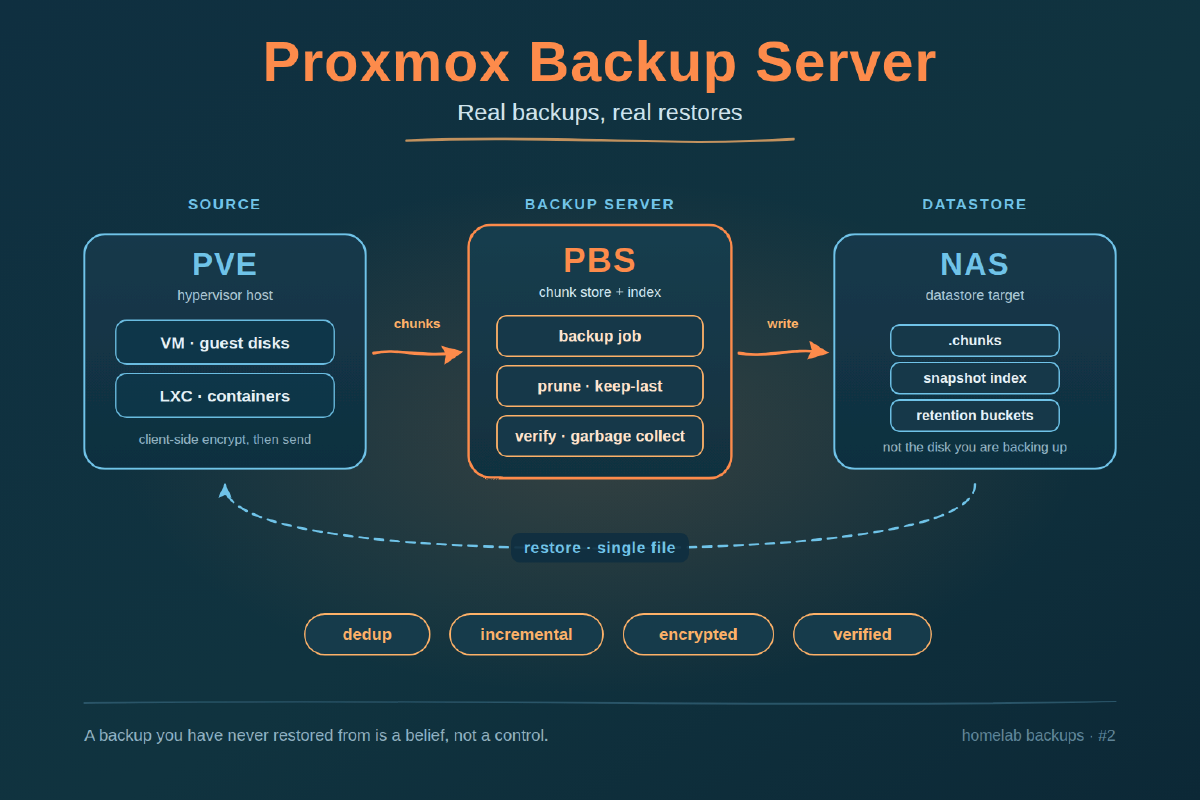
A backup you have never restored from is a belief, not a control. The homelab version of this goes: a nightly vzdump writes a few hundred gigabytes of compressed whole-VM archives to a NAS share, the job goes green for eleven months, and then the day you need one file back you discover the archive you want was silently truncated when the share filled up in March. This post stands up Proxmox Backup Server as a small VM, gives it a datastore, wires it into PVE, schedules one job, and then restores a single file from the shell and compares the hash — because the last step is the only one that proves any of the others worked.
Step 1: What PBS actually gives you over vzdump#
PBS is a dedicated backup server that speaks a chunk-based protocol instead of writing tarballs. Backups are incremental at the block level and deduplicated across every snapshot and every guest in the datastore, so the second backup of a 200 GB VM costs the changed chunks and nothing else. Encryption is client-side — PVE encrypts before the chunks leave the hypervisor, so the backup server never holds a usable copy of your data. Every chunk carries a checksum, and verify jobs re-read them on a schedule so bit rot surfaces while you still have a second copy. Retention is a prune policy with keep-last/daily/weekly/monthly buckets rather than a number of files, and single-file restore works without unpacking the whole guest. The full reference is at pbs.proxmox.com/docs.
Step 2: Prerequisites#
You need a working PVE host with enough headroom for one more small VM, and a storage target that is not the same physical disk your guests live on. A backup on the disk you are backing up is a copy, not a backup.
Sizing for the PBS VM: 2 vCPU, 4 GB RAM, and a 32 GB VirtIO disk for the operating system. PBS is idle at rest but hashes everything during backup and verification, so give it the second core. RAM matters more than cores once garbage collection runs against a large datastore — 4 GB is the homelab floor, 8 GB past a few terabytes.
For the datastore you need an NFS export, an iSCSI LUN, or a second virtual disk on different physical storage. Note up front what the PBS documentation says plainly: network-backed datastores are supported but slower and more fragile than local disks, because garbage collection and verification do a very large number of small random reads. It is the normal homelab compromise; just know you are making it.
Keep accurate time on the PBS host (chrony or systemd-timesyncd) — snapshot identifiers are timestamps.
Step 3: Install PBS as a VM#
Download the PBS ISO from proxmox.com and upload it to your PVE ISO storage, or pull it directly on the host:
cd /var/lib/vz/template/iso
wget https://enterprise.proxmox.com/iso/proxmox-backup-server_4.0-1.iso
Create the VM from the CLI so the settings are explicit rather than clicked:
qm create 900 \
  --name pbs \
  --memory 4096 --cores 2 --cpu host \
  --net0 virtio,bridge=vmbr0 \
  --scsihw virtio-scsi-single \
  --scsi0 local-lvm:32,discard=on,ssd=1 \
  --ide2 local:iso/proxmox-backup-server_4.0-1.iso,media=cdrom \
  --boot order='scsi0;ide2' \
  --ostype l26 \
  --agent enabled=1

qm start 900
Open the console and run the installer. Pick ext4 on the 32 GB disk — it holds only the operating system, so ZFS here buys nothing and spends RAM on an ARC caching the wrong thing. Set a static address during the network step; this post uses 192.0.2.10/24. Give it a hostname that resolves — pbs.example.com below.
When it reboots, detach the ISO (qm set 900 --ide2 none) and log in to https://192.0.2.10:8007 as root@pam.
On a no-subscription install the web UI raises a modal on every login. The Proxmox wiki documents a sed one-liner against /usr/share/javascript/proxmox-widget-toolkit/proxmoxlib.js that short-circuits the checked_command function, followed by systemctl restart proxmox-backup-proxy. It works, it is unsupported, and every toolkit update reverts it. Back the file up first.
Step 4: Mount the datastore#
Keep the operating system disk and the datastore separate. scsi0 is the 32 GB ext4 root from Step 3; the datastore is a mount point at /mnt/datastore/main backed by something else entirely.
Option A — NFS from a NAS. Create the mount point and add an entry to /etc/fstab:
apt install -y nfs-common
mkdir -p /mnt/datastore/main
# /etc/fstab
203.0.113.10:/export/pbs /mnt/datastore/main nfs4 _netdev,nofail,x-systemd.automount,noatime,hard 0 0The three options that matter: _netdev tells systemd this mount needs the network up first, nofail stops a NAS that is offline at boot from dropping PBS into emergency mode, and x-systemd.automount defers the mount until something touches the path, so boot never blocks on it. Use hard rather than soft — on a soft mount an I/O timeout returns an error to PBS mid-chunk-write and you get a corrupt snapshot instead of a stalled one.
Option B — iSCSI LUN. More setup, better behaviour under load, because you get a real block device and your own filesystem:
apt install -y open-iscsi
iscsiadm -m discovery -t sendtargets -p 203.0.113.10
iscsiadm -m node -T iqn.2026-09.com.example:pbs -p 203.0.113.10 --login
mkfs.ext4 -L pbs-main /dev/sdb
Mount it by label or UUID, never by /dev/sdb — device names reorder:
# /etc/fstab
LABEL=pbs-main  /mnt/datastore/main  ext4  _netdev,nofail,noatime  0  2
Either way, mount it and register the datastore:
systemctl daemon-reload && mount -a
findmnt /mnt/datastore/main

proxmox-backup-manager datastore create main /mnt/datastore/main
proxmox-backup-manager datastore list
Check findmnt before creating the datastore. If PBS writes its .chunks tree onto the root disk because the mount was not up, it fills 32 GB and then fails. Datastore layout and options: pbs.proxmox.com/docs/storage.html.
Step 5: Add PBS as PVE storage#
PVE needs the server name, the datastore name, credentials, and the TLS fingerprint. Grab the fingerprint on the PBS host:
proxmox-backup-manager cert info | grep -i fingerprint
# Fingerprint (sha256): a1:b2:c3:...:ff
Then on the PVE host:
pvesm add pbs backup-server \
  --server pbs.example.com \
  --datastore main \
  --username root@pam \
  --password \
  --fingerprint a1:b2:c3:...:ff \
  --content backup
--password with no value prompts on the terminal instead of writing the secret into your shell history. The credentials land in /etc/pve/storage.cfg and /etc/pve/priv/storage/.
The GUI path is the same thing: Datacenter → Storage → Add → Proxmox Backup Server, fill in ID, server, datastore, username, password, and fingerprint.
Two things before this becomes production. Do not back up as root@pam long-term — create a dedicated PBS user, grant it DatastoreBackup on /datastore/main, and use that. A credential that can only write backups cannot delete them, which is the whole point when the hypervisor is what gets compromised. And if you want client-side encryption, add --encryption-key, storing that key somewhere that is not the thing being backed up. Confirm the storage answers:
pvesm status --storage backup-serverStep 6: First scheduled backup#
Pick a guest you would not mind losing — a test VM, not the one running your DNS. Datacenter → Backup → Add, select the PBS storage as target, schedule 02:00 daily, mode Snapshot, and set retention to keep-last 7. From the CLI:
pvesh create /cluster/backup \
  --storage backup-server \
  --vmid 100 \
  --schedule "02:00" \
  --mode snapshot \
  --prune-backups 'keep-last=7' \
  --enabled 1 \
  --notification-mode notification-system
Run it once by hand rather than waiting for 02:00:
vzdump 100 --storage backup-server --mode snapshotRetention is expressed as prune options, and they stack rather than compete — a snapshot survives if any rule wants it:
| Option | Keeps |
|---|---|
keep-last=7 | the last 7 snapshots, regardless of age |
keep-daily=14 | the most recent snapshot of each of the last 14 days |
keep-weekly=8 | the most recent of each of the last 8 weeks |
keep-monthly=6 | the most recent of each of the last 6 months |
keep-last=7 alone is the honest starting point for a homelab: seven restore points, one week of history, predictable space. Add keep-monthly once you know the datastore’s real growth rate, not before.
Step 7: Restore one file from the shell#
This is the step that turns the job from a green checkmark into a control. Single-file restore out of a VM backup uses proxmox-file-restore on the PVE host:
export PBS_REPOSITORY='root@pam@pbs.example.com:main'
export PBS_FINGERPRINT='a1:b2:c3:...:ff'

# What snapshots exist?
proxmox-backup-client snapshot list

# What disks are in this one?
proxmox-file-restore list vm/100/2026-09-18T02:00:00Z

# Walk into a partition
proxmox-file-restore list vm/100/2026-09-18T02:00:00Z /drive-scsi0.img.fidx/part/2/etc

# Pull exactly one file out
proxmox-file-restore extract vm/100/2026-09-18T02:00:00Z \
  /drive-scsi0.img.fidx/part/2/etc/issue \
  --target /tmp/restore-test
Then compare it against the live copy:
sha256sum /tmp/restore-test/issue
ssh 192.0.2.20 sha256sum /etc/issue
Matching hashes mean the chunk store, the transport, and the restore path all work end to end. For host-level backups made with proxmox-backup-client rather than PVE, the equivalent is proxmox-backup-client restore host/pbs-client/2026-09-18T02:00:00Z etc.pxar /tmp/restore-test, which unpacks the archive into the target directory.
Do this once now and once per quarter. A restore you have not run since the last PBS major upgrade is back to being a belief.
Step 8: Prune and verify cadence#
Three jobs, three different purposes, and people routinely confuse the first two. Prune marks snapshots as removable according to the retention policy — it frees nothing on its own. Garbage collection is what actually reclaims disk, by deleting chunks no remaining snapshot references. Verify re-reads chunks and checks them against their stored checksums, which is the only thing in this list that detects silent corruption.
proxmox-backup-manager prune-job create daily-prune \
  --store main --schedule 'daily 03:30' --keep-last 7

proxmox-backup-manager datastore update main --gc-schedule 'sat 04:00'

proxmox-backup-manager verify-job create weekly-verify \
  --store main --schedule 'sat 05:00' \
  --ignore-verified true --outdated-after 30
--ignore-verified true --outdated-after 30 means “skip anything verified in the last 30 days”, so the weekly job re-reads a rolling slice instead of the whole datastore every Saturday. Stagger the times — verification inside a backup window competes for the same spindles and both run badly. Point PBS notifications at an address you actually read: a verification failure that lands in an ignored folder is a failure you learn about during a restore.
What we had before this#
Honesty about the starting point: what we had was vzdump writing compressed whole-VM archives to a NAS share on a nightly cron. It worked, in the sense that it produced files. Every run wrote the entire guest again, so retention was measured in how many full copies fit rather than how much history we wanted. No deduplication, no incremental transfer, no checksums, no verification pass — and no single-file restore, so recovering one configuration file meant restoring a whole VM to a scratch VMID first. We had not moved over either; the setup above is the build, written while doing it. The gap this closes is not the storage efficiency, pleasant as that is. It is that the old arrangement had no mechanism that would ever tell us a backup had gone bad, and this one does.
Next in this series: replication between two PBS instances so the offsite copy stops being a manual habit — see pve.proxmox.com/pve-docs/chapter-pvesr.html for where that fits alongside PVE’s own replication.